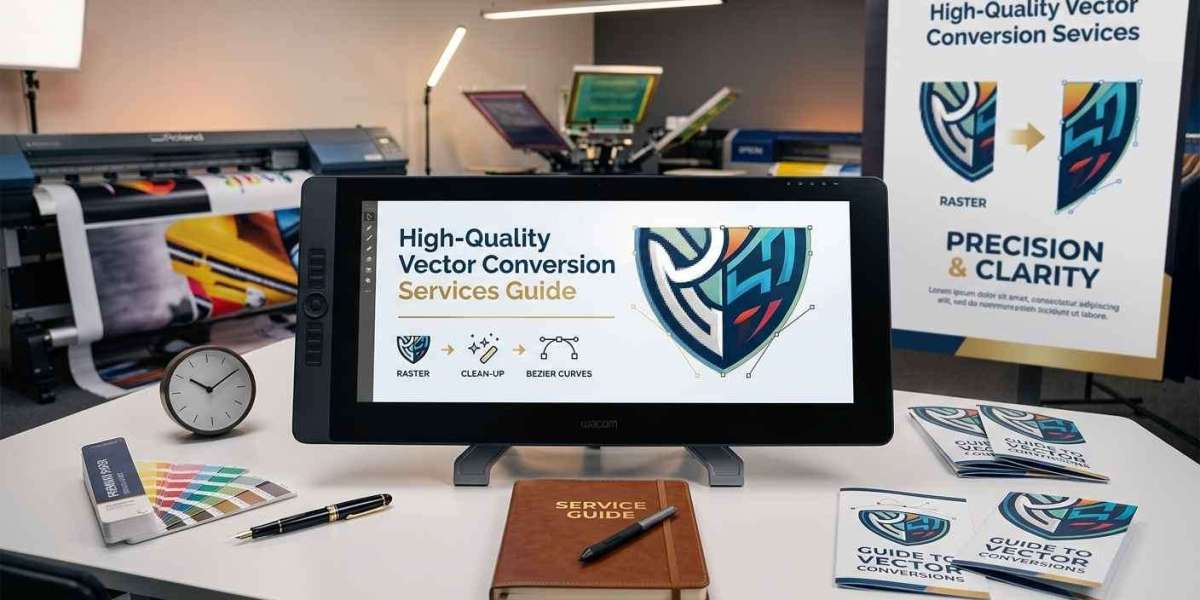

Getting started with digital artwork can be confusing when you encounter terms such as raster images, vector graphics, paths, anchor points, and file formats. A JPG or PNG may look perfectly clear on your computer, but it may not be suitable for every printing or design application. This is where high-quality vector conversion services can help. They transform pixel-based artwork into editable vector graphics that can be resized and adapted for different uses.
For beginners, understanding the purpose of vector conversion is more important than learning every technical feature of design software immediately. Once you understand how raster and vector graphics differ, what makes a conversion accurate, and which file format you need, it becomes much easier to prepare artwork for professional use.
This guide explains the basics of vector conversion, the process involved, common file formats, quality considerations, and practical tips for choosing a reliable service.
What Is Vector Conversion?
Vector conversion is the process of recreating a raster image as vector artwork.
Raster images are made from pixels. Common raster formats include JPG, PNG, GIF, and BMP. Their quality depends on resolution, which means enlarging a small image can result in visible pixels and blurry edges.
Vector graphics use mathematical paths to represent lines, curves, shapes, and other elements. Common vector formats include AI, EPS, SVG, and certain types of PDF files.
The goal of conversion is not simply to save a raster image in a vector file extension. The artwork must contain actual vector paths and editable elements.
For example, if a business has a small JPG version of its logo, a designer can recreate the logo using vector shapes and paths. The resulting file can then be used for larger printing and other design applications.
Raster vs. Vector Graphics
Understanding the difference between raster and vector artwork is the first step for beginners.
Raster Images
Raster images consist of individual pixels. Photographs are a common example because they contain complex color variations and fine visual details.
They are useful for:
- Photography
- Web images
- Digital artwork with complex textures
- Screenshots
- Detailed photographic graphics
However, raster images have limitations when significantly enlarged.
Vector Graphics
Vector artwork is constructed from paths, shapes, and mathematical instructions.
It is commonly used for:
- Logos
- Icons
- Typography
- Line drawings
- Illustrations
- Signs
- Packaging graphics
- Print designs
Because vector elements are mathematically defined, they can generally be resized without the pixelation associated with raster graphics.
Why Beginners May Need Vector Conversion
A beginner may wonder why a vector version is necessary when an existing PNG or JPG already looks good.
The answer depends on how the artwork will be used.
A small logo may look fine on a website but become blurry when printed on a large banner. A designer may also need to change individual colors, modify shapes, adjust text, or prepare the artwork for a specific production process.
A properly created vector file provides more control.
For businesses, this can be particularly useful because the same logo may be needed for business cards, packaging, signs, promotional materials, apparel, and digital applications.
Instead of creating a new design for every application, a vector master file can serve as a flexible source.
How High-Quality Vector Conversion Services Work
The conversion process can vary depending on the complexity of the artwork, but professional work generally follows several stages.
1. Artwork Evaluation
The original image is reviewed before conversion begins.
The designer may examine:
- Image resolution
- Number of colors
- Shape complexity
- Text and typography
- Background elements
- Fine details
- Intended use
A simple logo with two colors may require far less work than a detailed illustration.
2. Artwork Preparation
The source image may need to be cleaned or adjusted before vectorization. Unnecessary background elements can be removed, and the artwork can be prepared as a reference.
A clear source image usually makes accurate recreation easier.
3. Creating Vector Paths
The main shapes and outlines are recreated using vector paths.
This is one of the most important stages because poor path construction can create uneven curves, incorrect proportions, or unnecessary complexity.
Professional designers often pay close attention to anchor points and handles to create smooth curves.
4. Refining Details
Once the primary shapes are created, smaller details are reviewed.
This can include:
- Lettering
- Curves
- Spacing
- Alignment
- Small shapes
- Color boundaries
- Proportions
For complex artwork, this stage may require significant manual editing.
5. Color Recreation
Colors are recreated according to the source artwork and intended application.
For print projects, the designer may need to consider the printer's color requirements. The appropriate color system depends on the production process.
6. Quality Checking
The finished file should be reviewed before delivery.
A quality check may include examining the artwork at different sizes, checking paths, verifying colors, confirming proportions, and ensuring that unwanted elements have not been included.
What Makes Vector Conversion High Quality?
Not every vector file is equally useful.
A high-quality conversion should accurately represent the original artwork while remaining practical for editing and production.
Accurate Shapes and Proportions
The converted design should preserve the original proportions. Small changes to a logo can affect its appearance and brand identity.
Smooth Curves
Curved elements should appear smooth rather than uneven or segmented. Proper anchor-point placement is important for achieving this result.
Clean Paths
Too many unnecessary anchor points can make a file difficult to edit. Clean paths can make future modifications more manageable.
Correct Color Separation
Where applicable, individual colors should be organized so they can be edited or adjusted efficiently.
Editable Artwork
The final file should contain genuine vector elements rather than simply embedding a raster image inside a vector container.
Common Vector File Formats Explained
Beginners often become confused by the different file extensions used for vector graphics.
AI
AI is Adobe Illustrator's native file format. It is widely used for professional graphic design and provides extensive editing capabilities.
EPS
EPS has been widely used for professional graphics and printing. It is supported by many design and production workflows.
SVG
SVG is commonly used for web graphics and digital applications. It is scalable and can be edited using compatible software.
PDF can contain vector artwork and is frequently used for sharing and printing. However, not every PDF is necessarily a true vector file, so its contents should be checked.
The correct format depends on how the artwork will be used and what the receiving designer or printer requires.
Manual Vectorization vs. Automatic Tracing
One of the most important decisions in vector conversion is how the artwork will be recreated.
Automatic tracing uses software to detect edges and convert them into paths. It can be efficient for simple artwork with clear boundaries.
However, automatic tracing may create excessive anchor points, distorted curves, or unnecessary shapes when working with complex designs.
Manual vectorization gives the designer more control over the structure of the artwork. Individual shapes and curves can be recreated carefully.
A professional workflow may combine automated tools with manual refinement. The important factor is the quality of the final result rather than whether a particular tool was used.
How to Prepare Your Artwork Before Conversion
Beginners can make the process easier by providing the best available source image.
If possible, provide the original artwork rather than a screenshot. A higher-resolution image can provide more information about shapes, lettering, and colors.
You should also communicate how the artwork will be used.
For example, tell the designer whether the file is intended for:
- Large-format printing
- Packaging
- Business cards
- Promotional materials
- Apparel
- Website graphics
- Signage
Knowing the intended application can help the designer prepare the artwork appropriately.
Vector Conversion for Logos
Logo vectorization is one of the most common applications.
Businesses often receive logos in JPG or PNG format but later need editable artwork for printing. A vector version can make the logo easier to resize, recolor, and adapt.
A professionally recreated logo should preserve:
- Typography
- Proportions
- Shapes
- Spacing
- Color relationships
- Small design details
For brand assets, accuracy is particularly important because even minor changes can alter the appearance of the identity.
Vector Conversion for Professional Printing
Printing is one of the main reasons businesses request vector artwork.
A printer may need graphics for materials of different sizes. A single logo might be printed on a small label and a large sign.
Vector artwork gives the production team a flexible source that can be scaled without the same pixel-based limitations as a raster image.
It can also make it easier to modify colors, separate design elements, and prepare artwork for different production requirements.
However, vector artwork alone does not guarantee a perfect print result. Other factors, including color settings, typography, document dimensions, printing equipment, and material, also influence the final output.
Vector Conversion for Apparel and Merchandise
Vector graphics can also be useful for apparel and promotional products.
Designs may need to be resized or adjusted before being printed on different products. A clean vector source makes these changes easier.
For example, a logo used on a shirt may later need to be adapted for a promotional bag or product label.
The exact requirements depend on the decoration or printing method, so it is important to confirm production specifications before finalizing the artwork.
Common Mistakes Beginners Should Avoid
Beginners often make several mistakes when preparing vector artwork.
Assuming Every PDF Is a Vector File
A PDF can contain raster images, vector elements, or both. Simply receiving a PDF does not guarantee that the artwork has been properly vectorized.
Changing a File Extension
Renaming a JPG as EPS does not convert it into vector artwork. The image must be recreated using vector paths.
Relying Completely on Automatic Tracing
Automatic tracing can produce usable results for some simple designs, but complex artwork often requires manual cleanup.
Ignoring the Intended Use
A file prepared for website use may have different requirements from artwork intended for large-format printing.
Using Poor Source Artwork
A blurry or heavily compressed reference can make accurate recreation more difficult.
How to Choose High-Quality Vector Conversion Services
Choosing a provider should involve more than looking at the advertised price.
Start by reviewing examples of previous work. Look for projects similar to your artwork, especially if your design includes detailed lettering, curved shapes, multiple colors, or intricate illustrations.
Ask which file formats will be delivered and whether the final artwork will remain editable.
It is also useful to ask about revisions. If the converted artwork does not accurately match the source, a reasonable revision process can help resolve issues.
Communication matters as well. A reliable provider should understand your intended use and be able to discuss technical requirements clearly.
Questions to Ask Before Ordering
Before submitting your artwork, ask:
Will I receive an actual vector file?
Make sure the file contains editable vector paths.
Which formats are included?
Confirm whether you need AI, EPS, SVG, PDF, or another format.
Will the artwork be manually refined?
This can be especially important for detailed designs.
Can colors be edited?
Editable colors can make future changes easier.
Are revisions available?
Clarify what happens if the final artwork needs corrections.
Can the artwork be used for professional printing?
Tell the provider about your intended production method.
How Much Does Vector Conversion Cost?
The cost of vector conversion can vary considerably.
A simple logo with a few shapes and colors may require less work than a detailed illustration with many elements.
Factors that can influence pricing include:
- Artwork complexity
- Number of colors
- Amount of manual work
- Level of detail
- Required file formats
- Turnaround requirements
- Revision needs
Instead of choosing a provider based solely on the lowest price, consider whether the final artwork will meet your production requirements.
A poorly converted file may require additional corrections, increasing the overall cost of the project.
How to Check a Vector File After Delivery
Beginners can perform a basic quality check even without advanced design experience.
First, open the file in compatible vector software and zoom in on the artwork. Look for uneven curves, missing elements, or distorted shapes.
Next, check whether individual elements can be selected and edited. If the entire design behaves like one embedded image, it may not have been properly vectorized.
Review the colors and compare them with the original reference.
Finally, confirm that the delivered file formats match what you requested.
For important commercial projects, having the file reviewed by the printer or designer before production can provide additional assurance.
Benefits of Maintaining a Vector Master File
Once artwork has been converted successfully, keep the original vector file in a secure location.
A vector master can become a useful long-term design asset. It can be adapted for future projects without requiring the artwork to be recreated each time.
This can save time when a business introduces new products, updates marketing materials, changes packaging sizes, or expands its branding across different channels.
It is also a good practice to keep multiple file formats when appropriate, provided each file is correctly prepared.
Conclusion
For beginners, vector conversion may initially seem like a technical design task, but its purpose is straightforward: create flexible, editable artwork that can be used reliably across different applications.
High-quality vector conversion involves more than changing a file extension or running an image through automatic tracing software. It requires accurate paths, clean curves, appropriate colors, correct proportions, and a file structure that supports future editing.
Before ordering a conversion, consider the artwork's intended use, required file format, level of detail, and production requirements. Review previous work from the provider and confirm what will be included with the final delivery.
A properly converted vector file can remain useful for years and support everything from professional printing to branding, packaging, signage, and digital applications. idigitize can be considered when you need professionally prepared artwork for different design and production requirements.
FAQs
Q1. What is vector conversion?
Vector conversion is the process of recreating a raster image as editable vector artwork using paths, shapes, and curves.
Q2. Why do I need a vector version of my logo?
A vector logo can be resized for different applications while maintaining clean edges and proportions. It also provides greater flexibility for editing and professional production.
Q3. Is JPG a vector format?
No. JPG is a raster format that uses pixels. Common vector formats include AI, EPS, SVG, and vector-based PDF files.
Q4. Can PNG be converted into vector artwork?
Yes. A PNG can be used as a reference for recreating the design as vector artwork. The quality of the result depends on the complexity of the design and the conversion process.
Q5. Is automatic tracing enough for professional vector conversion?
It depends on the artwork. Automatic tracing can work for simple designs, but complex graphics often require manual refinement and quality checking.
Q6. Which vector format is best?
There is no single format that is best for every situation. AI, EPS, SVG, and PDF each have different applications. The correct choice depends on your designer, printer, software, and intended use.
Q7. Can vector artwork be used for large printing?
Yes. Vector graphics are commonly used for large-format applications because they can be scaled without the pixelation associated with raster images.
Q8. How can I tell whether a file is actually vector?
Open the file in compatible vector software and try selecting individual elements. Genuine vector artwork should contain editable paths and shapes rather than only an embedded raster image.